![[CCO] Certification Coaching Organization LLC](https://www.cco.us/wp-content/uploads/2015/05/CCO-Logo-2015-d3-500px.png "[CCO] Certification Coaching Organization LLC")
You can cancel your CCO Academy subscription yourself, right inside the CCO Academy. You do not need to sign in to any separate billing site. Just follow these steps:
- Log in to the CCO Academy, if you’re not already: Go to the CCO Login Portal and sign in with your usual email and password.
- Go to Academy: Click the CCO Academy card after you land on the portal dashboard to enter the CCO Academy.
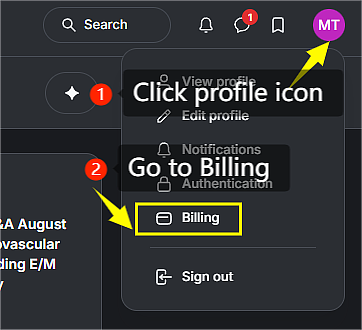 In the CCO Academy, click your profile icon in the top-right corner, then select Billing from the dropdown menu.
- Go to the Subscriptions tab. This shows your active memberships.
- Start the cancellation. Find your active subscription, click the three-dot (⋯) menu next to it, and select Cancel.
- Confirm. Click Confirm cancelation in the prompt that appears.
Good to know:
- You keep full access to your content until the end of your current billing period.
- CCO does not provide refunds or prorated credits for partial periods, because access is delivered instantly.
- If you do not see a Cancel option, submit a cancellation request through the CCO Academy Help Desk and a team member will cancel it for you.